For two years, the honest answer to “how do I track AI Overviews?” was that you couldn’t, not in Google’s own tools. By 31 August 2026 that had changed: Search Console’s generative AI performance report had reached every site. It reports impressions — not clicks, and not queries. Tracking AI Overviews is now possible, but only partly, and the missing part is where most of the questions are.
What Search Console shows you now
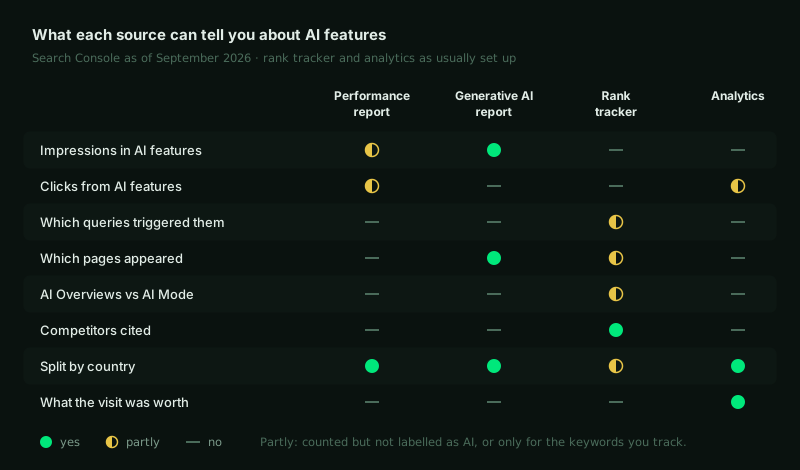
There are two places to look, and they answer different questions.
The Performance report: AI traffic was always in there
Clicks and impressions from AI Overviews and AI Mode have been counted in the ordinary Performance report all along, under the Web search type, mixed in with everything else. Google’s counting rules for them are specific:
- AI Overviews. A click on a link counts as a click, and “an AI Overview occupies a single position in search results, and all links in the AI Overview are assigned that same position.”
- AI Mode. A click on an external link counts as a click, and position follows the same method as an ordinary results page. A follow-up question counts as a brand-new query.
- Search Labs experiments are not included at all.
The first rule is easy to miss and explains a lot. A page cited in an AI Overview at the top of the results is recorded at that top position, which is one reason impressions and average position can improve while clicks fall.
The generative AI performance report: a separate view, impressions only
Google announced the report on 3 June 2026, tested it with a subset of sites, and had rolled it out to every site worldwide by 31 August. It isolates impressions from AI Overviews and AI Mode, and gives you:
- Impressions: how often links to your site appeared in those features.
- Pages: which URLs appeared, assigned to the canonical URL as elsewhere in Search Console.
- Countries and devices.
- Dates, down to hourly granularity.
It leaves out four things you will want:
- Clicks. You can see that a page was shown in an AI answer, not whether anyone visited because of it.
- Queries. There is no query dimension, so you cannot see which questions triggered the appearance.
- AI Overviews versus AI Mode. The two are counted together.
- Mentions without a link. An impression is a link to your site being shown. An answer that names your brand but links to someone else does not count for you.
The usual Performance report limits apply, including the 1,000-row table cap, and a site with too few AI impressions may not see the report at all.
What it means for traffic
Because the report has no clicks, the question everyone asks — how much traffic are AI Overviews costing me? — still has to be answered indirectly. The independent evidence points one way:
- Pew Research Center analysed the March 2025 browsing of 900 US adults. On searches that showed an AI summary, people clicked a traditional result 8% of the time, against 15% on searches without one. Only 1% clicked a link inside the summary itself.
- Ahrefs compared 300,000 keywords between December 2023 and December 2025 and found that an AI Overview correlates with a 58% lower click-through rate for the page in position one — up from the 34.5% it measured a year earlier.
Google’s documentation takes a different angle: when people click from results pages with AI Overviews, it says, “these clicks are higher quality”, meaning visitors tend to spend more time on the site. Both can be true at once — fewer clicks, better ones — which is why the measurement worth doing is not clicks alone but what the remaining visits are worth.
What rank trackers add, and where they mislead
Third-party tools fill the query gap. Give them a keyword list and they record whether an AI Overview appears, whether your URL is cited and who else is — competitive questions Search Console cannot answer. Three cautions before you trust the output.
They sample a moving target. Ahrefs followed more than 43,000 keywords for a month and found an AI Overview’s content changed between consecutive observations 70% of the time, lasting about 2.15 days on average. Only 54.5% of cited URLs carried over from one response to the next. A weekly check is a snapshot of something that changes every two days.
Rankings are no longer a proxy for citations. In Ahrefs’ March 2026 analysis of 863,000 keywords, 38% of AI Overview citations came from pages in the top ten, down from about 76% in its July 2025 study. Tracking positions tells you less about citations every year.
They see from their location, not your customers’. A check from one data centre says little about the answer a buyer in another country gets. And Google’s 2026 guidance is blunt about tools that claim more: “No third-party tool has access to our internal ranking or AI systems.”
Analytics: keep an eye on direct traffic
A click from an AI Overview or AI Mode normally arrives as Google organic traffic. Twice it has not. In May 2025, links in AI Mode carried rel="noreferrer", so visits showed up as direct traffic until Google fixed what its John Mueller called a bug, within days. In March 2026, links in AI Mode’s sidebar were reported to pass no referrer either. If direct traffic to informational landing pages jumps while organic dips, rule that out before drawing conclusions.
The routine I use
This is the monthly setup I run on multi-market sites. Once it is built, it takes about an hour.
Export AI impressions by page and country
From the generative AI report, per market. On an international site the country split matters more than the total: AI Mode reached different countries months apart, and the same page can be cited heavily in one market and never in another.
Join them to clicks from the Performance report
Same pages, same countries, same month. Pages with rising AI impressions and falling organic clicks are where an AI answer is absorbing the visit; pages with AI impressions and steady clicks are where it is sending people on.
Group pages by template and intent
Individual URLs are noisy. Guides, product pages and category pages behave differently, and the pattern only shows in groups.
Track a fixed set of questions per market
Twenty to fifty buyer questions, written natively for each market and checked on a schedule, recording presence, citation and competitors. This is the query layer Search Console does not give you. To see how other assistants answer the same question, the free AI visibility checker puts it to Claude, OpenAI and Perplexity.
Measure what the visits are worth
Engagement and conversions on the pages AI features cite, in analytics. If Google is right that these clicks are better, this is where it shows — not in click counts.
Why the questions have to be per market, and not translated from English, is covered in answer engine optimisation for multi-market brands.
Before you consider opting out
Since 31 August 2026 every site also has a Search generative AI control in its Search Console settings. Excluding a site removes its links and content from AI Overviews, AI Mode and the generative AI features in Discover. Google says the control is not used as a ranking or inclusion signal anywhere else in Search, and that it does not affect model training — that remains the job of Google-Extended. It takes a few days to apply, and it follows property inheritance, so a URL-prefix property for one market’s folder can be set differently from the rest of the domain.
Opting out removes the impressions along with the answers. For most sites the decision depends on numbers only the generative AI report can show, so read a few months of it first.
Sources
- Google Search Central, AI features and your website, last updated 10 December 2025.
- Google Search Central, Optimizing your website for generative AI features on Google Search, last updated 10 July 2026.
- Google Search Central Blog, Introducing Search Generative AI performance reports in Search Console, 3 June 2026, updated 31 August 2026.
- Search Console Help, Generative AI performance report (Search), What are impressions, position, and clicks? and Search generative AI control, retrieved 15 September 2026.
- Pew Research Center, Google users are less likely to click on links when an AI summary appears in the results, 22 July 2025.
- Ryan Law, Update: AI Overviews reduce clicks by 58%, Ahrefs, 4 February 2026.
- Louise Linehan, AI Overview change study, Ahrefs, 11 November 2025; and Update: 38% of AI Overview citations pull from the top 10, Ahrefs, 2 March 2026.
- Google fixes AI Mode traffic attribution bug, Search Engine Journal, 28 May 2025; Google AI Mode sidebar links don’t pass referrers, Search Engine Roundtable, 3 March 2026.